
The M8Chat app
People and members.
Find anyone on M8Chat and start a private, encrypted chat with them.
Use this guide when
- You want to message someone you have not chatted with yet.
- You want to see who is in a chat and what their role is.
There are two ways to start a private chat: search everyone with People, or pick someone from the Members list of a chat you share.
- Step 1
Search with People
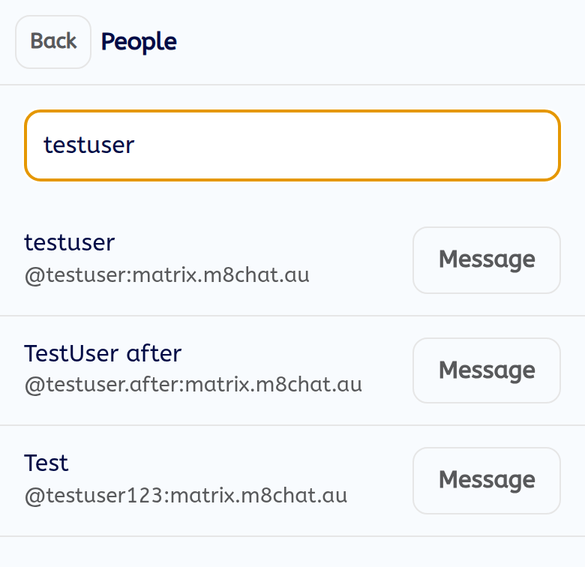
Tap “People” at the top of the chat list. Type at least two letters of a name or username. Results show the name and the username underneath.
- Step 2
Tap "Message"
The app opens your private chat with that person. If you already have one, it opens that chat. If not, it makes a new encrypted chat and invites them. They see it as an invitation until they tap “Join”.
- Step 3
See who is in a chat
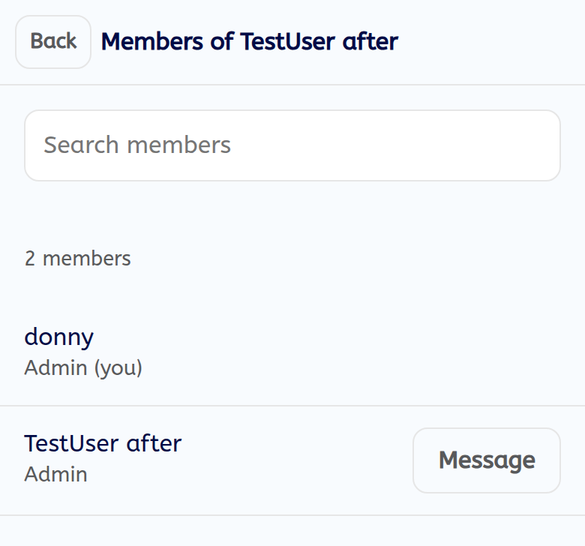
Inside a chat, tap “Members”. You see how many members there are, each name, and a role: Admin, Moderator or Member. Use “Search members” to find someone. Tap “Message” next to a name to start a private chat with them.
If something goes wrong
It says "No one found."
Check the spelling, or try part of their username.
The button says "Could not start"
The private chat could not be made. Check your connection and try again.
Can I add people to a chat?
Not in the app yet. Use Element to invite people to a group chat.